Protect Your Privacy Before You Share
AI-powered face detection. Blur or cover faces in seconds.
Take control of your privacy. HiddenFace uses AI to detect faces and lets you cover any area in your photos. 100% free, works entirely on your device.

Your Face is Your Most Sensitive Data
Every photo you share online exposes your facial biometric data to unknown risks
Facial Recognition Databases
Tech companies and data brokers are building massive facial recognition databases from public photos without your consent.
Children at Risk
Photos of children shared online can be scraped and used in ways parents never intended, creating permanent digital footprints.
Identity Theft
Facial data can be used for deepfakes, identity fraud, and unauthorized surveillance that follows you everywhere.
Unlike passwords, you can't change your face once it's compromised.
Powerful Protection, Simple to Use
Everything you need to protect faces in your photos before sharing
AI Face Detection
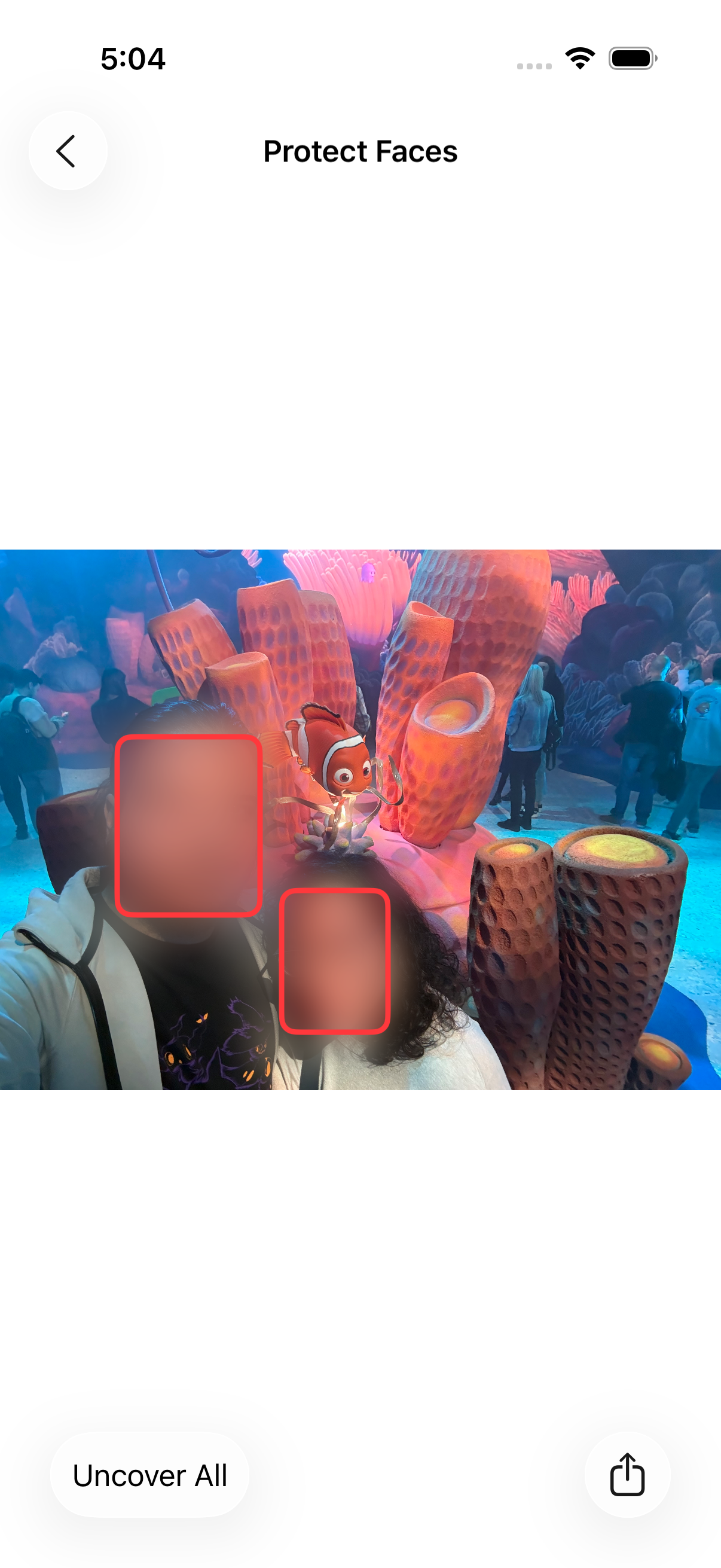
Instantly detects all faces and hides them by default in record time
Custom Areas
Tap anywhere to cover any area, not just faces. Perfect for plates and addresses
Blur & Emoji Options
Choose blur effect or 46+ emoji covers to match your style
100% On-Device
All processing happens locally. Your photos never leave your device
Protect Faces in 4 Simple Steps
From photo to protected share in seconds
Select a Photo
Choose any photo from your gallery or files
AI Detects Faces
Our AI instantly finds and highlights all faces
Customize Coverage
Tap faces to toggle, or add custom areas anywhere you need
Share Safely
Export and share your privacy-protected photo
Your Privacy is Sacred
We built HiddenFace with privacy at its core, not as an afterthought
No Data Collection
We don't collect, store, or analyze any of your photos or data
On-Device AI
All face detection runs locally on your iPhone. Nothing is uploaded
No Account Required
Use HiddenFace without creating an account or signing in
100% Free to Use
All features free. Optional purchase removes watermark only
HiddenFace will never access, analyze, or share your photos. Your privacy is not our business model.
Who Uses HiddenFace?
Privacy protection for everyone
Parents
Protect your children's faces when sharing family photos online
Travelers
Share travel memories while respecting the privacy of strangers
Content Creators
Maintain privacy standards while creating engaging content
Professionals
Share work photos while protecting client and colleague privacy
Frequently Asked Questions
Does HiddenFace upload my photos anywhere?
No, absolutely not. All processing happens 100% on your device. Your photos never leave your iPhone. We don't have servers that receive or store your images.
What's the difference between blur and emoji?
Blur applies a privacy-protecting blur effect to faces, making them unrecognizable. Emoji covers replace faces with fun emoji expressions, adding personality while protecting identity.
Can I undo the face protection after saving?
Once you export a protected photo, the blur or emoji is permanently applied to that file. Your original photo remains untouched in your photo library.
Does it work with group photos?
Yes! HiddenFace's AI can detect multiple faces in a single photo. You can choose to protect some faces while leaving others visible.
Is HiddenFace free?
Yes! All features are 100% free to use. Shared photos include a small watermark. A one-time purchase removes the watermark forever—no subscriptions.
Can I cover more than just faces?
Yes! Tap the + button to add custom cover areas anywhere on your photo. Perfect for license plates, addresses, or any sensitive information you want to hide.
What devices are supported?
HiddenFace works on iPhone and iPad running iOS 17 or later. The AI features require devices with Apple's Neural Engine for optimal performance.
Protect Your Faces, Protect Your Privacy
Download HiddenFace and take control of your facial biometric data